A business owner I spoke to recently had been running Google Ads for three years. Same budget, same general approach – and over the past year, her cost per lead had roughly doubled. She assumed the market had just become more competitive. It had, slightly. But that wasn’t the main problem.
The main problem was that Google had changed how the platform works – and nobody had told her.
If your cost per lead has been creeping up without an obvious reason, this is likely what’s happening to you.
The Real Reason Your Cost Per Lead Has Increased
Three years ago, experienced Google Ads practitioners could control campaigns tightly – manual bidding, precise keyword match types, detailed ad scheduling. That era is essentially over.
Google has shifted almost everything toward Smart Bidding: Target CPA, Target ROAS, Maximise Conversions. The AI sets bids at the individual auction level based on predicted conversion probability. In theory, this beats human bidding over time. In practice, Smart Bidding is only as good as the data it learns from.
If your conversion tracking has gaps, your landing page conversion rate is low, or your creative hasn’t been refreshed in six months, the algorithm compensates by bidding more aggressively to find users who will convert. That’s what rising CPL looks like from the inside.
The platform isn’t broken. But it rewards different inputs now. Understanding that distinction is what separates accounts that improve over time from ones that gradually cost more for the same results.
What Google’s August 2026 Bidding Overhaul Actually Changes
Google’s August 2026 update introduces changes to how Smart Bidding manages Target CPA and Target ROAS campaigns. Reviewing your campaign settings now can help you avoid unexpected performance changes and keep your advertising costs under control.
The August 2026 Target CPA/ROAS correction: what it means for you
Google’s mid-August update targets campaigns that have been over-performing relative to their stated Target CPA or Target ROAS. If your campaign has been delivering results below your target cost – which sounds positive – Google will now pull it back toward the stated goal, redistributing budget more conservatively.
For Singapore SMEs, the practical check is this: look at your current Target CPA or Target ROAS settings. If they were set up when the account was created and haven’t been updated, they may no longer reflect your actual cost benchmarks. A Target CPA that’s too low triggers the correction; a Target CPA that reflects your real benchmark avoids it.
Update your targets before August 15. It takes five minutes and removes unnecessary exposure to the change.
What Smart Bidding Is Optimising For (It’s Not Your Budget)
Smart Bidding optimises for one thing: the conversion event you’ve defined. Simple in principle, but it creates a dependency most Singapore SMEs underestimate.
The most common tracking failures we see when auditing accounts:
- Tracking page views as conversions instead of form submissions or phone calls
- Duplicate tracking from both Google Tag Manager and the native Google Ads tag – inflating conversion numbers
- WhatsApp clicks not tracked at all, despite being the primary enquiry channel for many Singapore businesses
- No distinction between a casual website visit and a genuine sales lead
When Smart Bidding is fed bad data, it makes bad bidding decisions – and the damage compounds week by week. Fixing tracking isn’t glamorous, but it’s the highest-leverage thing most Singapore SME advertisers can do.
The Five Levers You Still Control
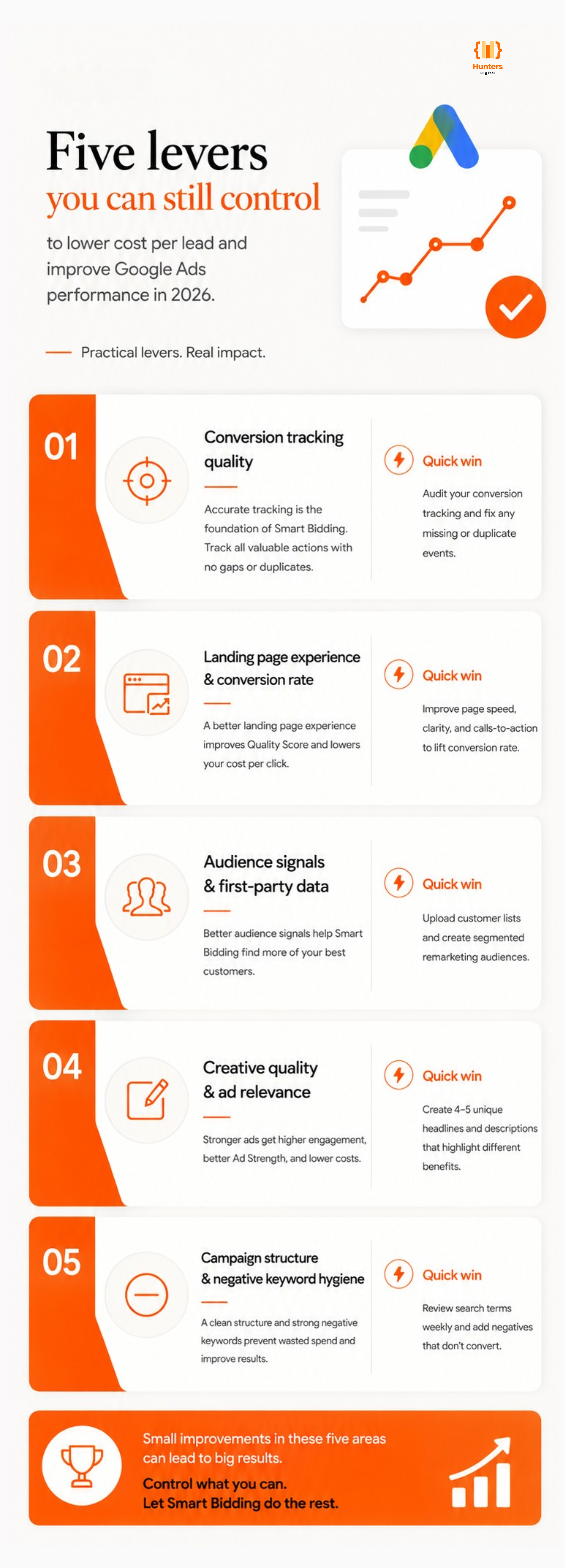
Google’s AI handles bidding, but your campaign performance is still influenced by the quality of your data, ads, and landing pages. Focusing on these five key areas can help you achieve more conversions while keeping costs under control.
Lever 1: Conversion Tracking Quality
Fix this first. Before adjusting bids, budgets, or campaign structure, confirm that every meaningful conversion event is being tracked accurately. Form submissions, calls, WhatsApp clicks, purchases – all of them, with no duplicates and no gaps.
If you’re not certain your tracking is correct, assume it isn’t. Most accounts we audit have at least one tracking issue affecting Smart Bidding performance.
Lever 2: Landing Page Experience and Conversion Rate
Quality Score – which directly affects how much you pay per click – has three components. Most advertisers focus on ad relevance and expected CTR. Landing page experience is often the weakest of the three and the least addressed.
A page converting at 1.5% signals to Google that the traffic arriving is not finding what it expected. That erodes your quality score over time, which raises your effective CPC. Moving a landing page from 1.5% to 3.5% conversion rate reduces cost per lead by more than half – without changing a single bid.
Lever 3: Audience Signals and First-Party Data
Smart Bidding uses audience signals to calibrate bids at every auction. The richer and more accurate those signals, the better the algorithm performs.
Two things most Singapore SMEs aren’t using but should be:
- Customer match lists – upload your existing customer database. Google finds similar high-value prospects and bids more aggressively for them.
- Segmented remarketing audiences – visitors to your pricing page are not the same as general site visitors. Treat them differently.
This is one area where smaller advertisers consistently underinvest. First-party data is a genuine competitive advantage in a Smart Bidding environment.
Lever 4: Creative Quality and Ad Relevance
Responsive Search Ads with low Ad Strength ratings consistently underperform. Google needs enough headline and description variations to find the combinations that resonate with different searchers. If your RSAs are rated “Poor” or “Average,” that’s a direct drag on performance.
The practical fix: write four or five genuinely distinct headlines – one benefit-focused, one differentiator-focused, one social proof, one CTA-focused, one that includes your primary keyword. Don’t just rephrase the same idea five times. Google needs variety to learn.
Lever 5: Campaign Structure and Negative Keyword Hygiene
Broad match under Smart Bidding reaches further than most advertisers expect. Without a strong negative keyword list, budget leaks into searches that are adjacent but unlikely to convert – inflating click volume while diluting conversion rate.
Check your search terms report weekly. Any query that generated clicks but zero conversions over 30 days is a candidate for exclusion. Pay particular attention to informational queries, competitor brand terms (unless you’re deliberately targeting them), and job-seeker searches if your audience is business buyers.
How to Audit Your Account in 30 Minutes
| Audit Area | What to Check |
| Conversion Tracking | Every key event tracked? WhatsApp included? No duplicate tags? |
| Target CPA/ROAS Settings | Do your targets reflect actual historical CPL, or are they defaults? |
| Search Terms Report | Any irrelevant queries receiving significant budget? |
| Landing Page CVR | What is the current conversion rate on your key landing pages? |
| RSA Ad Strength | Are all Responsive Search Ads rated Good or Excellent? |
| Audience Lists | Are customer match and remarketing lists connected to campaigns? |
| August 2026 Update | Any campaigns flagged as over-delivering vs Target CPA? |
When to Bring in Professional Management
You can run the 30-minute audit yourself. But if your spend exceeds $2,500 per month and your cost per lead isn’t clearly tracked and consistently improving, the compounding cost of an underperforming account justifies professional management quickly.
When evaluating a Google Ads agency, these are the questions that reveal whether they know what they’re doing:
- What is my current cost per lead by campaign – can you show me that before recommending anything?
- How do you set up and verify conversion tracking, and what events do you track?
- How often do you review Search Term Reports, and who makes negative keyword decisions?
- What does your creative testing process look like?
An agency that leads with their campaign structure or budget recommendations before addressing tracking isn’t starting in the right place.
Conclusion
Google Ads continues to evolve, and businesses that adapt to Google’s AI-driven bidding and optimisation strategies will achieve better results. Instead of simply increasing your budget, focus on accurate conversion tracking, high-performing landing pages, relevant ad creatives, and regular campaign optimisation. These improvements can lower your cost per lead, increase conversions, and maximise your return on ad spend.
If your campaigns aren’t delivering the results you expect, it’s time to review your account and identify opportunities for improvement before increasing your advertising spend.
Get a Free Google Ads Audit
If you’re spending over S$2,500 per month on Google Ads and your cost per lead isn’t consistently improving, Hunters Digital can help. Our Google Ads specialists work with Singapore SMEs to identify wasted ad spend, optimise campaign performance, and improve ROI.
Request your FREE Google Ads Audit today and discover what’s driving your costs – and how to fix it.
Frequently Asked Questions
Almost never. Manual CPC removes Google’s ability to calibrate bids against thousands of real-time auction signals. Over a 60-day horizon with clean conversion data, Smart Bidding consistently outperforms manual bidding. The right answer is to fix the inputs Smart Bidding relies on – not abandon the strategy.
Significant changes to targets, budgets, or campaign structure trigger a learning period of 7–14 days. During this period, performance fluctuates. Avoid making multiple major changes simultaneously – make one change, wait for learning to complete, then assess. Stacking changes during a learning phase produces unreadable data.
It varies considerably by industry. Professional services (legal, financial, recruitment) typically range from $80–$250 per lead. Home services and renovation run $40–$120. Healthcare and aesthetics vary widely by treatment type. Education and tuition typically sit between $25–$80. These are indicative ranges – your actual CPL depends on quality score, competition, and landing page performance.
Three likely causes: increased competition in your category, a declining quality score from stale creative or underperforming landing pages, or broad match expansion pulling in higher-competition queries your keywords weren’t previously matching. The Search Terms Report and Quality Score column in Google Ads will tell you which.

Suggested Articles
- Are LinkedIn Ads Worth It for Singapore B2B Companies? A Practical Budget, Offer, and Lead-Quality Framework

- Website Maintenance in Singapore: What SMEs Should Expect from a Plan That Protects Leads, Security, and Search Visibility
- SEO Pricing in Singapore: What a Good SEO Retainer Should Include – and What to Question Before You Sign
- How to Choose a Digital Marketing Agency in Singapore: 10 Questions That Protect Your Budget, Accounts, and Data