Website maintenance is easy to treat as a background task – something to hand off, pay for, and not think about much. That view makes sense if a website is purely a brochure. It makes less sense if the site is collecting enquiries, supporting Google Ads campaigns, ranking for commercial search terms, or handling customer transactions.
For businesses in that second category, an unmaintained website is not a mild inconvenience. It’s a source of lead loss, security exposure, ad spend waste, and gradually declining search visibility. The maintenance plan that makes sense for each business depends on how much the website is doing commercially.
This guide helps Singapore SMEs understand what a maintenance plan should cover, how to match the scope to their actual business risk, and what to ask before signing.
Why Website Maintenance Is a Business Risk Issue, Not Just a Technical One
The case for maintenance is often made in technical terms: keep the CMS updated, patch security vulnerabilities, run backups. These are real requirements. But they don’t describe the commercial cost of getting them wrong.
Consider what happens when maintenance is neglected on a lead-generating Singapore website:
- A plugin conflict disables the contact form. Enquiries stop arriving, but the site looks normal.
- A security vulnerability is exploited. The site is defaced or begins redirecting visitors to spam.
- Page speed degrades with accumulated plugin and theme bloat. Quality Score drops on Google Ads. Cost per click rises.
- Conversion tracking breaks after a CMS update. Google Ads Smart Bidding optimises against incomplete data. Campaign performance declines.
- An SSL certificate expires. Browsers show a security warning. Trust signals disappear.
None of these are theoretical. They are the most common consequences of inadequate maintenance on business websites. And each one has a direct cost: lost leads, wasted ad spend, or a period of degraded search visibility.
What a Website Maintenance Plan Should Actually Cover
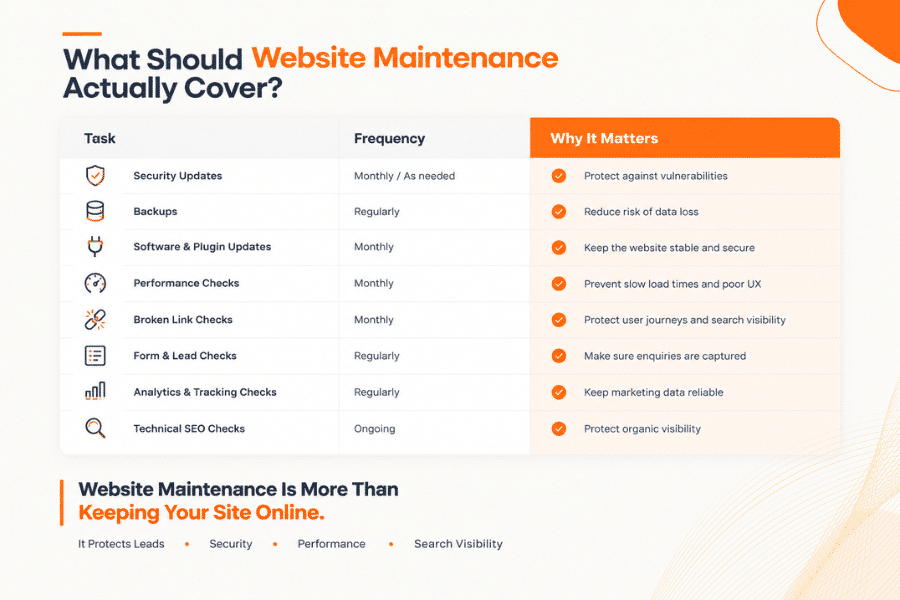
A good website maintenance plan should do more than keep your CMS updated. For a commercial website, maintenance should protect the parts that directly affect leads, advertising, search visibility, and customer trust. That means checking forms and CTAs, monitoring uptime and security, testing backups, reviewing performance, verifying conversion tracking, and keeping important website content accurate. The right plan should be based on what your website actually does for your business – not simply a checklist of technical tasks.
| Maintenance Task | Why It Matters for Lead-Generating Sites | Recommended Frequency |
| CMS, plugin, and theme updates | Outdated software creates security vulnerabilities. Some updates affect layout or form functionality – changes should be tested before and after. | Monthly (at minimum) |
| Security scanning and monitoring | Detects malware, injection attempts, and defacement early. Essential for sites handling form data or customer information. | Weekly or continuous |
| Uptime monitoring | Ensures the site alerts someone immediately when it goes offline. Without monitoring, downtime may go undetected for hours. | Continuous |
| Backup and restore testing | Backups that have never been tested may fail when needed. Restore testing confirms the backup is usable. | Monthly test of latest backup |
| Form, CTA, and conversion tracking checks | Contact forms break silently. Conversion pixels break after CMS updates. Regular checks prevent lead loss and tracking data gaps. | Monthly (or after any update) |
| Performance and Core Web Vitals | Page speed affects both user experience and Google Ads Quality Score. Gradual plugin bloat degrades performance unnoticed. | Quarterly (monthly for high-traffic sites) |
| SSL certificate | An expired SSL displays browser security warnings – immediately damaging trust and likely increasing bounce rate from paid campaigns. | Monitor expiry; renew before lapse |
| Content updates | Service pages, pricing, team profiles, and business hours need to stay accurate. Outdated content affects trust and can trigger Google quality signals. | On request, or included in plan |
The Maintenance Plan Scorecard: Matching Scope to Business Risk
Not every website requires the same maintenance investment. The right scope depends on what the website is doing commercially.
| Site Type | Primary Risk if Maintenance Neglected | Recommended Scope Level |
| Brochure-only site, no forms, low traffic | Security exposure, outdated information | Basic: monthly updates + backup + uptime monitoring |
| Lead-generating site with contact forms | Silent form failure, lead loss, tracking gaps | Standard: all of the above + monthly form/tracking checks |
| Site supporting active paid ad campaigns | Tracking breakage, Quality Score decline, wasted ad spend | Enhanced: Standard + performance monitoring + post-update tracking verification |
| Ecommerce site (Shopify, WooCommerce) | Transaction failure, inventory errors, payment gateway issues | Enhanced or Premium: daily backups + payment/checkout testing + stock integration checks |
| Site with strong organic rankings | Indexing changes, crawl errors from updates, content freshness signals | Enhanced: includes monthly Search Console review + canonicalisation checks |
What’s Typically Not Included (and Why It Matters)
Understanding what a maintenance plan excludes is as important as understanding what it includes. Common exclusions worth clarifying before signing:
- “New page creation” – Most plans cover updates to existing content, not building new pages or sections.
- “Redesign or layout changes” – Structural changes to the site’s design fall outside standard maintenance and typically require a separate project quote.
- “Fixing issues caused by third-party plugins or integrations” – If a CRM, booking system, or payment gateway update breaks your site, this may fall outside a basic maintenance scope.
- “SEO management” – Maintenance keeps the site technically healthy, but ongoing keyword strategy, content creation, and link building are separate services.
- “Emergency response outside business hours” – Standard plans typically cover business-hours support. 24/7 emergency response or defined SLAs for site-down events require a premium plan.
- “Restoration after a successful attack” – If a security breach occurs despite monitoring, full site restoration may be quoted separately, particularly for complex or extensive compromises.
Questions to Ask Before Signing a Maintenance Plan
Before committing to any website maintenance arrangement in Singapore, these are the questions worth asking:
- If my contact form stops working, how quickly will it be detected and fixed?
- Are backups tested – or just taken? Can you restore a specific previous version if needed?
- Do you check that conversion tracking and Google Analytics are functioning after each CMS update?
- What is the response time if my site goes offline during business hours?
- Does the plan cover Wix/Shopify platform-managed sites, or only WordPress?
- What specifically requires a separate quote or project scope?
These questions distinguish a maintenance plan that protects a commercial asset from one that ticks boxes.
Conclusion
Website maintenance is not simply about keeping plugins updated or making sure a website is online. If your website generates enquiries, supports Google Ads, contributes to organic rankings, or handles customer transactions, it is a critical business asset that needs ongoing attention.
A strong maintenance plan helps prevent the problems that are often hardest to notice: a contact form quietly stopping, tracking data disappearing, pages becoming slower, security vulnerabilities going undetected, or an update affecting search visibility. The goal is not just to fix problems after they happen, but to identify and address risks before they start affecting your business.
The right maintenance scope should match your website’s commercial importance, traffic, technology, and level of risk. Before signing a plan, make sure you understand exactly what is monitored, what is tested, how quickly issues are handled, and what falls outside the agreed scope.
Is Your Website Actually Being Maintained, or Just Updated?
If your website collects leads, supports paid campaigns, ranks commercially, or plays a major role in customer acquisition, don’t leave critical functions to chance.
Request a website maintenance consultation with us. We provide website maintenance for Singapore businesses with clearly defined scope and conversion-critical checks, helping you keep your website secure, functional, measurable, and ready to generate business.
Frequently Asked Questions
Pricing varies depending on the platform, site complexity, the scope of tasks included, and whether content updates are part of the plan. Basic WordPress maintenance plans covering updates, security, and backups typically start at a few hundred dollars per month. Plans that include performance monitoring, form checks, conversion tracking verification, and a defined response time are priced higher. Shopify and Wix sites may have different pricing structures given that the platforms handle hosting and core updates natively.
Shopify and Wix handle their own hosting, security patches, and platform updates – so some elements of a traditional WordPress maintenance plan are less relevant. However, these sites still benefit from regular form and conversion tracking checks, content accuracy reviews, performance monitoring, and app or integration management. The maintenance scope is different, not absent.
WordPress core, themes, and plugins should be reviewed and updated at least monthly. Updates should be applied in a staging environment or with a current backup taken immediately before and tested afterward – particularly checking that contact forms, payment gateways, and any custom functionality are working correctly. Skipping updates for extended periods increases security risk and can cause compatibility problems when updates are eventually applied.
With uptime monitoring in place, a downtime alert should trigger within minutes. Without it, downtime may go undetected until a visitor or staff member notices – which could be hours. A maintenance plan with continuous uptime monitoring and a defined response time means that downtime affecting your lead flow, paid campaigns, or customer experience is addressed quickly. If your current plan doesn’t include uptime monitoring, that’s a gap worth closing.